North star · Keep the page quiet and editorial, letting a precisely framed product screenshot and restrained red-blue actions carry the visual emphasis.
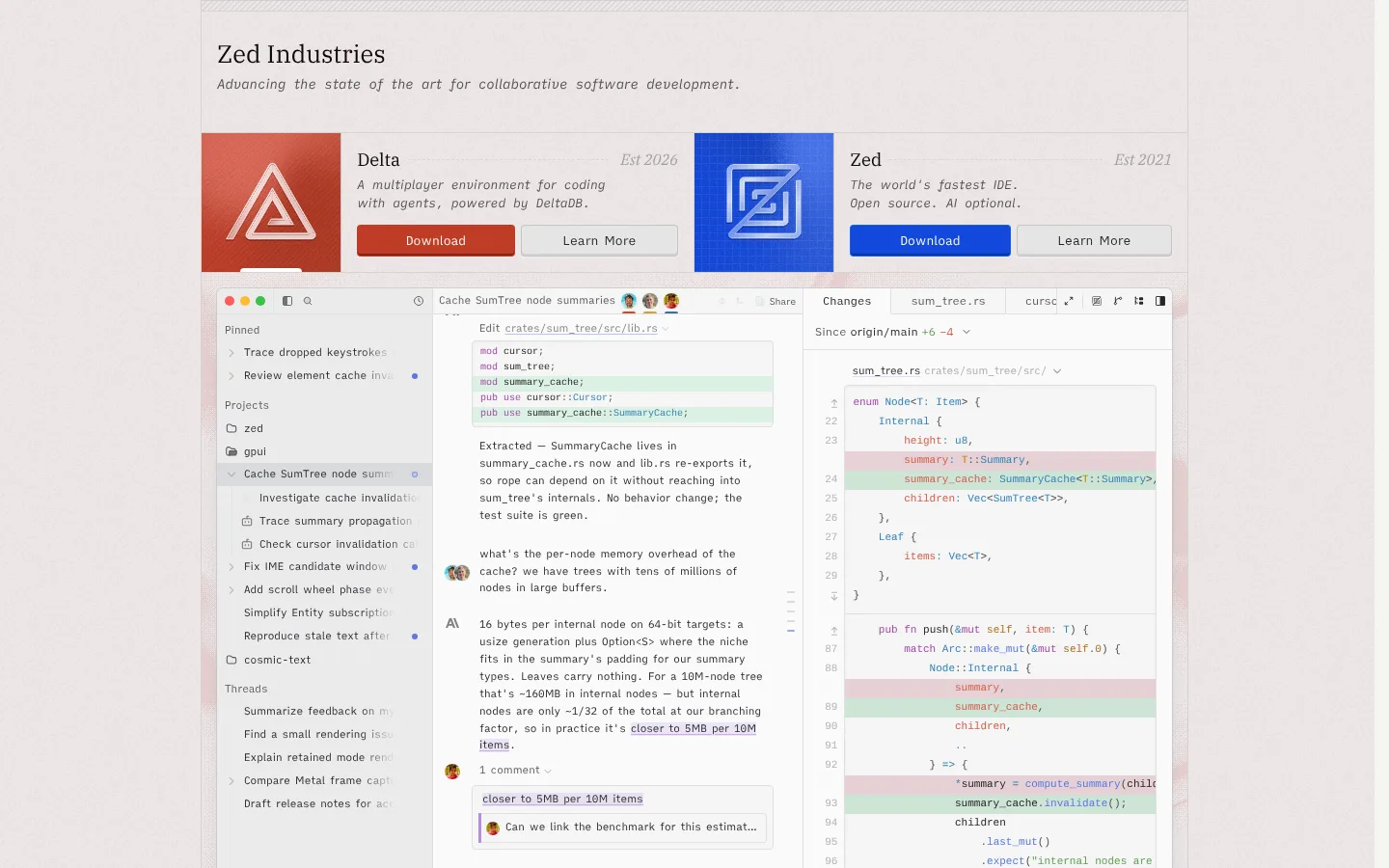
The page uses a warm, pale canvas and low-contrast gray surfaces to keep attention on product content rather than decoration. Ink-colored text carries nearly all of the hierarchy; muted gray supports explanatory copy, while red and blue are reserved for the two prominent download actions and their product marks. A restrained serif gives the brand heading and product names an editorial tone, contrasted with a compact custom sans for descriptions and controls. The screenshot shows a centered, framed page with a narrow masthead, a horizontal two-product introduction, and a large code-editor image directly below. Content sits in orderly bands with fine borders and little visible shadow, making the page feel structured but not heavy. The product image supplies most of the visual complexity, including interface details and syntax colors; these should read as screenshot content, not as additional site-wide brand colors.
配色
点色块复制色值。用途说明来自对页面的实测位置(背景、文字、描边、按钮)与截图判读。
品牌色
强调色
表层色
中性色
功能色
页面底色 · Warm Mist表层 · Paper White表层 2 · Quiet Gray表层 3 · Clean White主文字 · Soft Ink次要文字 · Muted Graphite弱文字 · Slate Copy描边 · Quiet Gray强调 · Signal Blue强调 2 · Signal Vermilion强调 3 · Link Blue
Main sans-serif for body copy, navigation, captions, and buttons.
Aa 设计
ui-monospace
系统字体 · 字重 400 · 占比 17%
免费替代:Roboto Mono
Code and editor-like text.
Aa 设计
plexSerif
网络字体 · 字重 400 / 390 / 410 · 占比 1%
免费替代:IBM Plex Serif
Editorial display face for the main heading and section headings.
角色
示例
字号
字重
行高
字距
一级标题
Main brand or page heading in the masthead.
The quick brown fox 敏捷的狐狸
25.5px
390
1.25
0
二级标题
Product names and secondary section headings.
The quick brown fox 敏捷的狐狸
18.5px
410
1.2
0
正文
Product descriptions and supporting editorial copy.
The quick brown fox 敏捷的狐狸
13px
400
1.5
0
辅助文字
Small dates, labels, and image or card annotations.
The quick brown fox 敏捷的狐狸
11px
400
1.63
0
按钮
Download and Learn More control labels.
The quick brown fox 敏捷的狐狸
13px
400
1.5
0
导航
Compact navigation and interface labels.
The quick brown fox 敏捷的狐狸
11px
400
1.82
0
代码
Editor screenshot code and technical snippets.
const style = 1;
11px
400
1.82
0
间距与布局
基准单位 4px · 密度:适中
—版块间距
6px元素间距
—卡片内边距
1022px内容最大宽度
1px
2px
4px
6px
8px
16px
20px
A centered page column sits within a broad, pale canvas; measured page max width is 1022px. The masthead forms a shallow full-width band, followed by two product introductions arranged side by side. Each product pairs a square mark with its name, short description, date, and actions. A wide editor screenshot begins immediately beneath this row and dominates the first view. Alignment is crisp and mostly left-led, with compact gaps and fine dividing lines. Keep the overall density comfortable and the section rhythm restrained rather than adding generous, unmeasured whitespace.
圆角与层次
按钮 · 4px
卡片 · 4px
图片 · 50%
hairline · media
inset · card, other
inset · button
inset · button
The page is mostly flat, using fine gray borders and pale banding to define structure. Media receives a subtle hairline edge, while controls use restrained inset shading rather than floating card shadows. Keep layering minimal: product artwork and the large editor screenshot provide depth through content, not through heavy elevation.
组件
下面的预览按实测的按钮、输入框、徽标、卡片样式重建(字体用替代字体)。
Masthead
Compact editorial heading with a serif brand title and a short, italic-looking supporting line.
Product introduction
Two side-by-side product bands pair square artwork with a serif name, muted description, date, and two actions.
Download action
Compact 13px writer button with a 4px radius, white label, thin contrasting border, and subtle inset shadow; red for Delta and blue for Zed.
Learn More action
Pale neutral button with dark text, a fine gray border, a 4px radius, and restrained inset shading.
Editor media
Wide, light editor screenshot with a fine boundary; it is the dominant visual and contains its own interface colors.
Imagery · The primary visual is a large, straight-on screenshot of Zed’s code editor, framed as a wide rectangular media panel beneath the product row. It shows realistic code, collaboration, and editor chrome rather than decorative illustration. Two square product marks sit beside their introductions: a warm red geometric Delta mark and a blue Zed mark. Preserve these as product artwork; do not promote their internal colors or screenshot syntax accents into broad page backgrounds.
Use Warm Mist and Paper White for quiet page surfaces.
Keep primary text in Soft Ink.
Reserve Signal Blue and Signal Vermilion for product-specific emphasis.
Use serif typography for editorial headings.
Frame product media with subtle borders.
Keep content centered and aligned in clear horizontal bands.
✕ 不该做
Don’t turn screenshot syntax colors into page-wide accents.
Don’t use heavy shadows or dramatic gradients.
Don’t replace the muted canvas with stark high-contrast blocks.
Don’t use oversized, dense display typography.
Don’t scatter red and blue accents indiscriminately.
Don’t invent extra spacing or rounded-card treatments.
给 AI 的提示词
想快速出一个同风格的新页面,把这段话连同 DESIGN.md 一起发给 AI。
Build a new page in Zed’s restrained developer-tool style. Use Warm Mist (#eee7e7) and Paper White (#f5f5f3) for a pale, quiet canvas, with Soft Ink (#242529) for primary text and muted gray for supporting copy. Set editorial headings in a light serif similar to IBM Plex Serif; use a compact sans for descriptions and controls, and monospace only for code. Center the content in a measured-width column, using thin borders and clear horizontal bands instead of card-heavy decoration. Give the page one dominant, realistic product screenshot framed with a subtle hairline. Use Signal Blue (#1348dc) or Signal Vermilion (#bf3c27) sparingly for a primary action, with white button text and restrained inset depth. Keep hierarchy crisp, compact, and product-led.