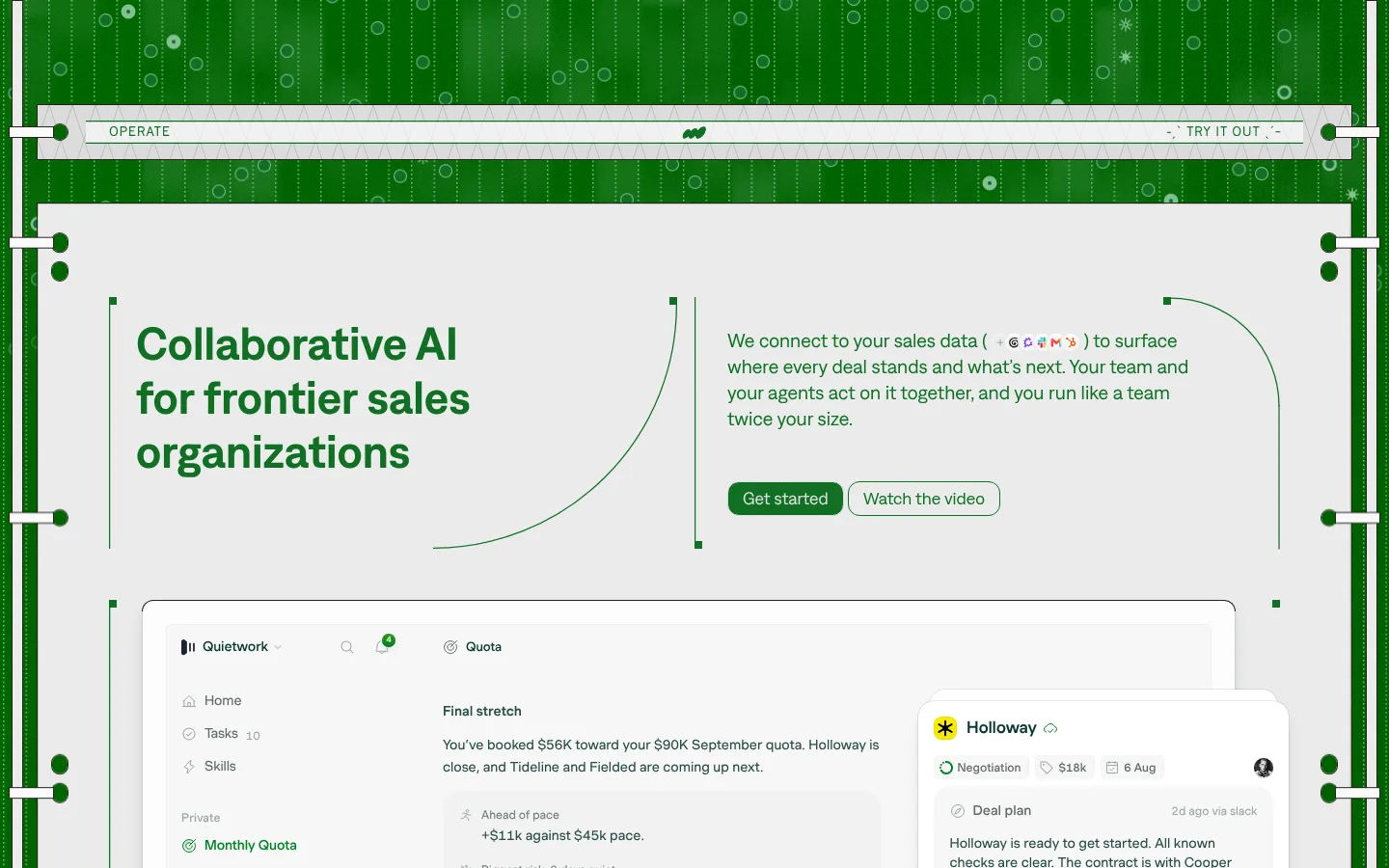
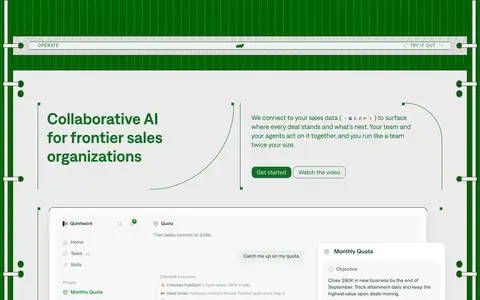
Operate以鲜明的绿色线路式外框,衬托浅色编辑式内容面板与产品界面预览。简洁的大写导航和圆角绿色按钮,与醒目的主标题及细致的销售流程内容形成平衡。
North star · Treat every content panel as a calm, readable interface mounted inside a precise green technical frame.
The page is built around a strong contrast between the deep green outer field and broad pale-gray content panels. Fine vertical rails, dotted circuitry, and small circular markers make the frame feel engineered, while curved green rules soften the geometry inside the panels. The palette stays tightly focused: dark green anchors the canvas and primary actions; brighter greens appear in headings, links, badges, and small interface details; charcoal and muted green carry text. Denim is the main workhorse typeface, giving the headline and paragraph copy a clean, sturdy voice. Cinetype is reserved for compact uppercase wayfinding and eyebrow labels, adding a technical editorial accent. The hero aligns a large left headline with supporting copy and two adjacent actions, then gives a product interface screenshot substantial space. Later content uses ruled columns and pale green panels rather than decorative imagery. Spacing feels comfortable and deliberate, with visible breathing room between content blocks.
配色 点色块复制色值。用途说明来自对页面的实测位置(背景、文字、描边、按钮)与截图判读。
品牌色
Operate Green
#117025
Primary green for hero headline, primary CTA, badges, links, and selected footer details.
Deep Canopy
#005c00
Dominant outer canvas and background field surrounding the pale page panels.
强调色
Button Sage
#77aa83
Secondary video-action fill and small supportive green accents.
Signal Green
#008125
Subtle green gradient and small incidental interface accents.
Bright Sprout
#269600
Small gradient or interface accent; use sparingly rather than as a broad surface.
表层色
Panel Gray
#ebebeb
Main pale content-panel background against the saturated green outer canvas.
Soft Paper
#f7f7f7
Light card and interface surfaces; also appears in subtle fading gradients.
Pale Leaf
#94ba9d
Soft green panel accent, notably in the tinted editorial statement section.
Pure White
#ffffff
Raised product cards and crisp interface surfaces within screenshots and mockups.
中性色
Warm Ink
#29211e
Dark text and fine structural borders where high contrast is needed.
Rule Gray
#cad3d2
Thin card borders and hairlines separating content areas.
Soft Divider
#dcdcdc
Minor button and interface details; not a defining brand color.
功能色
Forest Text
#294d47
Muted green text for supporting copy and secondary interface content.
Slate Moss
#5f6d6b
Secondary muted text and lower-emphasis interface labels.
Quiet Sage
#71807e
Low-emphasis text detail within content and interface areas.
Mist Gray
#9ba8a7
Subdued small text and low-contrast interface details.
文字 背景 对比度 WCAG #29211e Warm Ink#ebebeb Panel Gray13.24:1 AAA #29211e Warm Ink#f7f7f7 Soft Paper14.73:1 AAA #29211e Warm Ink#94ba9d Pale Leaf7.34:1 AAA #29211e Warm Ink#ffffff Pure White15.78:1 AAA #294d47 Forest Text#ebebeb Panel Gray7.84:1 AAA #294d47 Forest Text#f7f7f7 Soft Paper8.72:1 AAA
字体 字号阶梯:Perfect Fifth(比例约 1.549,正文 20px)。示例用免费替代字体渲染,数值为实测。
Aa 设计
muoto 网络字体 · 字重 400 / 450 / 500 · 占比 46%
免费替代:Inter
Product interface and selected card content
Aa 设计
denim 网络字体 · 字重 400 / 600 · 占比 46%
免费替代:Inter
Headlines, body copy, buttons, and most page text
Aa 设计
cinetype 网络字体 · 字重 400 · 占比 8%
免费替代:Space Mono
Eyebrows and small navigation-style links
角色 示例 字号 字重 行高 字距 一级标题 Large hero statement, aligned to the left column.
Operate
48px 600 1.17 0 二级标题 Section headings for the explanatory content blocks.
Operate
32px 600 1.13 0 正文 Hero explanation and longer editorial or feature copy.
The quick brown fox 敏捷的狐狸
20px 400 1.35 0 辅助文字 Supporting copy and compact descriptive text.
The quick brown fox 敏捷的狐狸
18px 400 1.33 0 按钮 Primary and secondary call-to-action labels.
The quick brown fox 敏捷的狐狸
18px 400 1.11 0 链接 Small uppercase navigation and inline action links.
The quick brown fox 敏捷的狐狸
14px 400 1.71 0.05em 眉题 Uppercase section labels and technical overlines.
The quick brown fox 敏捷的狐狸
14px 400 1.71 0.05em 代码 Small monospaced product-interface or code-like details.
const style = 1;
11px 400 1.1 0
间距与布局 基准单位 4px · 密度:适中
44px 版块间距
8px 元素间距
— 卡片内边距
1435px 内容最大宽度
1px
2px
3px
4px
6px
7px
8px
10px
12px
14px
15px
16px
17px
24px
28px
Use a wide, centered page canvas with a measured maximum width of 1435px and a comfortable content density. Frame the pale main panel inside a dark-green field, using narrow rails, dots, and occasional short crossbars as a persistent motif. In the hero, align headline and description in separate columns, with actions below the copy; place a large product preview beneath. Continue with ruled columns and editorial bands. Preserve generous section separation and clear internal alignment rather than crowding content.
圆角与层次 md · other
inset · other
inset · other
sm · media
The page is mostly flat: pale panels sit against the green field, with thin rules and framed edges doing most of the separation. Use modest, soft shadows under product media and overlapping UI cards to establish depth. Avoid heavy drop shadows; the interface mockups should feel layered but still clean and restrained.
组件 下面的预览按实测的按钮、输入框、徽标、卡片样式重建(字体用替代字体)。
Technical outer frame Deep green field with slim rails, dotted vertical traces, circular nodes, and small crossbars framing the pale page panels.
Top navigation strip Narrow pale horizontal bar inside the frame, with Operate at left, a centered mark, and a compact uppercase try-it-out link at right.
Two-column hero Large green headline at left; supporting paragraph and paired actions at right, with fine curved rules and vertical markers.
Primary action Operate Green #117025 fill with light text and a thin light border; rounded pill-like form as shown in the hero.
Product preview Large pale dashboard frame with nested quota and deal cards, rounded corners, dense interface detail, and restrained shadow.
Editorial process list Numbered rows with compact headings, short descriptions, small outlined status badges, and thin horizontal dividers.
Statement band Pale green multi-column editorial panel, divided by vertical rules and finished with small line-art details.
Imagery · The main visual is a large, realistic sales-dashboard product preview, accompanied by overlapping deal and quota interface cards. Keep product imagery inside pale, softly rounded frames, with subtle shadows and crisp interface detail. The surrounding decoration is primarily linework and circuit-like dots, not photography or illustrative scenes. A small video preview appears in the footer area; keep it secondary to the software interface.
页面版块 共 1 个版块,按页面从上到下排列,每个都标了类型、布局和交互套路。
该做与不该做 ✓ 该做 Keep the deep green outer field visibly distinct from the pale content panels. Use green for key headings, primary actions, links, and small status markers. Pair a direct headline with a separate, readable supporting-copy column. Use fine rails, dots, and ruled dividers to sustain the technical framing. Give product screenshots and UI cards the main visual emphasis. Reserve uppercase, tracked labels for navigation and eyebrows. ✕ 不该做 Do not replace the framed green-and-gray composition with a plain white canvas. Do not use unrelated bright colors as prominent accents. Do not make the interface mockups feel like decorative illustrations. Do not overuse shadows or add heavy gradients across large panels. Do not set all content in uppercase or monospaced type. Do not crowd the hero or process rows with dense, uninterrupted copy. 给 AI 的提示词 想快速出一个同风格的新页面,把这段话连同 DESIGN.md 一起发给 AI。
复制 Build a new Operate-style AI sales page using a deep green outer frame and broad pale content panels. Use Deep Canopy #005c00 for the surrounding canvas, Panel Gray #ebebeb for the primary page surface, and Operate Green #117025 for headlines, links, and the main action. Set large, sturdy headlines and readable copy in a Denim-like sans serif; reserve an uppercase, tracked Cinetype-like face for small labels. Frame the page with fine rails, dotted traces, and restrained circular markers. Organize the hero as a two-column statement and explanation, then show a substantial, believable sales-dashboard preview in softly rounded cards. Use ruled columns and a Pale Leaf #94ba9d editorial band for later sections. Keep spacing comfortable, hierarchy clear, borders thin, and shadows limited to layered product media.
DESIGN.md Tailwind v4 CSS 变量 Design Tokens
---
title: "Operate design system"
variant: extended
source: https://operate.so/
captured_at: 2026-10-12
theme: light
industry: ai
generator: Design DNA (https://four.wiralomi.com/style/operate-so)
ai_generated: true
ai_label: "本文件由 AI 辅助生成:数值取自公开网页的实测样式,命名、用途说明与建议为模型解读。商标归原所有者。 / AI-assisted content"
---
# Operate · Design System
> A precision-framed canvas for collaborative AI
**Theme:** light · **Industry:** ai · **Source:** https://operate.so/ · **Captured:** 2026-10-12 (1440×900 desktop)
_AI-assisted content: values are measured from the public page at capture time; names, roles and guidance are model-written interpretations. Trademarks belong to their owners._
Operate pairs a vivid green, circuit-like outer frame with pale editorial panels and product UI previews. Compact uppercase wayfinding and rounded green controls balance the large, direct headline with detailed sales-workflow content.
## North star
Treat every content panel as a calm, readable interface mounted inside a precise green technical frame.
## Overview
The page is built around a strong contrast between the deep green outer field and broad pale-gray content panels. Fine vertical rails, dotted circuitry, and small circular markers make the frame feel engineered, while curved green rules soften the geometry inside the panels. The palette stays tightly focused: dark green anchors the canvas and primary actions; brighter greens appear in headings, links, badges, and small interface details; charcoal and muted green carry text. Denim is the main workhorse typeface, giving the headline and paragraph copy a clean, sturdy voice. Cinetype is reserved for compact uppercase wayfinding and eyebrow labels, adding a technical editorial accent. The hero aligns a large left headline with supporting copy and two adjacent actions, then gives a product interface screenshot substantial space. Later content uses ruled columns and pale green panels rather than decorative imagery. Spacing feels comfortable and deliberate, with visible breathing room between content blocks.
## Colors
| Name | Hex | Token | Group | Role |
|---|---|---|---|---|
| Operate Green | ` | `--color-operate-green` | brand | Primary green for hero headline, primary CTA, badges, links, and selected footer details. |
| Panel Gray | ` | `--color-panel-gray` | surface | Main pale content-panel background against the saturated green outer canvas. |
| Soft Paper | ` | `--color-soft-paper` | surface | Light card and interface surfaces; also appears in subtle fading gradients. |
| Warm Ink | ` | `--color-warm-ink` | neutral | Dark text and fine structural borders where high contrast is needed. |
| Deep Canopy | ` | `--color-deep-canopy` | brand | Dominant outer canvas and background field surrounding the pale page panels. |
| Forest Text | ` | `--color-forest-text` | semantic | Muted green text for supporting copy and secondary interface content. |
| Slate Moss | ` | `--color-slate-moss` | semantic | Secondary muted text and lower-emphasis interface labels. |
| Quiet Sage | ` | `--color-quiet-sage` | semantic | Low-emphasis text detail within content and interface areas. |
| Pale Leaf | ` | `--color-pale-leaf` | surface | Soft green panel accent, notably in the tinted editorial statement section. |
| Pure White | ` | `--color-pure-white` | surface | Raised product cards and crisp interface surfaces within screenshots and mockups. |
| Button Sage | ` | `--color-button-sage` | accent | Secondary video-action fill and small supportive green accents. |
| Mist Gray | ` | `--color-mist-gray` | semantic | Subdued small text and low-contrast interface details. |
| Rule Gray | ` | `--color-rule-gray` | neutral | Thin card borders and hairlines separating content areas. |
| Soft Divider | ` | `--color-soft-divider` | neutral | Minor button and interface details; not a defining brand color. |
| Signal Green | ` | `--color-signal-green` | accent | Subtle green gradient and small incidental interface accents. |
| Bright Sprout | ` | `--color-bright-sprout` | accent | Small gradient or interface accent; use sparingly rather than as a broad surface. |
### Semantic aliases
`--color-canvas` → ` (Panel Gray) · `--color-surface` → ` (Soft Paper) · `--color-surface-2` → ` (Pale Leaf) · `--color-surface-3` → ` (Pure White) · `--color-text` → ` (Warm Ink) · `--color-text-muted` → ` (Forest Text) · `--color-text-subtle` → ` (Slate Moss) · `--color-border` → ` (Rule Gray) · `--color-accent` → ` (Operate Green) · `--color-accent-2` → ` (Deep Canopy) · `--color-accent-3` → ` (Button Sage) · `--color-on-accent` → `
### Contrast (WCAG 2.x)
| Text | Background | Ratio | Level |
|---|---|---|---|
| ` | ` | 13.24:1 | AAA |
| ` | ` | 14.73:1 | AAA |
| ` | ` | 7.34:1 | AAA |
| ` | ` | 15.78:1 | AAA |
| ` | ` | 7.84:1 | AAA |
| ` | ` | 8.72:1 | AAA |
| ` | ` | 4.35:1 | AA-large |
| ` | ` | 9.35:1 | AAA |
| ` | ` | 4.53:1 | AA |
| ` | ` | 5.04:1 | AA |
### Gradients
- `linear-gradient(rgba(0, 129, 37, 0.05) 0%, rgba(0, 129, 37, 0.05) 100%), none`
- `linear-gradient(rgba(0, 0, 0, 0) 0%, lab(100 0 0) 100%)`
- `linear-gradient(rgb(247, 247, 247) 0%, lab(0 0 0 / 0) 100%)`
- `linear-gradient(rgba(255, 255, 255, 0.08) 0%, rgba(255, 255, 255, 0) 100%), none`
## Typography
| Family | Token | Source | Weights | Role | Free substitute |
|---|---|---|---|---|---|
| muoto | `--font-muoto` | webfont | 400, 450, 500 | Product interface and selected card content | Inter |
| denim | `--font-body` | webfont | 400, 600 | Headlines, body copy, buttons, and most page text | Inter |
| cinetype | `--font-cinetype` | webfont | 400 | Eyebrows and small navigation-style links | Space Mono |
- **muoto:** Measured weights 400, 450, and 500; use for compact interface copy, not the main display voice.
- **denim:** Weights 400 and 600; sentence case for copy, with confident semibold display headings.
- **cinetype:** Regular weight; uppercase labels with visibly expanded tracking.
### Type scale — Perfect Fifth (ratio ≈ 1.549, base 20px)
| Role | Size | Weight | Line height | Letter spacing | Case | Family | Used for |
|---|---|---|---|---|---|---|---|
| h1 | 48px | 600 | 1.17 | 0 | — | denim | Large hero statement, aligned to the left column. |
| h2 | 32px | 600 | 1.13 | 0 | — | denim | Section headings for the explanatory content blocks. |
| body | 20px | 400 | 1.35 | 0 | — | denim | Hero explanation and longer editorial or feature copy. |
| caption | 18px | 400 | 1.33 | 0 | — | denim | Supporting copy and compact descriptive text. |
| button | 18px | 400 | 1.11 | 0 | — | denim | Primary and secondary call-to-action labels. |
| link | 14px | 400 | 1.71 | 0.05em | uppercase | cinetype | Small uppercase navigation and inline action links. |
| eyebrow | 14px | 400 | 1.71 | 0.05em | uppercase | cinetype | Uppercase section labels and technical overlines. |
| code | 11px | 400 | 1.1 | 0 | — | Courier New | Small monospaced product-interface or code-like details. |
OpenType features in use: `"liga" 0` .
## Spacing & layout
- Base unit **4px**, density **comfortable**.
- Scale (most used values): 1, 2, 3, 4, 6, 7, 8, 10, 12, 14, 15, 16, 17, 24, 28 px.
- Section rhythm 44px · element gap 8px · card padding — · max content width 1435px.
Use a wide, centered page canvas with a measured maximum width of 1435px and a comfortable content density. Frame the pale main panel inside a dark-green field, using narrow rails, dots, and occasional short crossbars as a persistent motif. In the hero, align headline and description in separate columns, with actions below the copy; place a large product preview beneath. Continue with ruled columns and editorial bands. Preserve generous section separation and clear internal alignment rather than crowding content.
## Shape & elevation
- Radius: button `50%` · card `16px` · media `50%` · badge `3px` · link `8px` · xs `3px` · sm `5px` · md `6px` · lg `8px` · xl `10px` · 2xl `12px` · pill `9999px`
- Shadow `md` (other): `rgba(0, 0, 0, 0) 0px 0px 0px 0px, rgba(0, 0, 0, 0) 0px 0px 0px 0px, rgba(0, 0, 0, 0) 0px 0px 0px 0px, rgba(0, 0, 0, 0) 0px 0px 0px 0px, rgb(235, 235, 235) 0px 0px 0px 1.83px, rgba(0, 0, 0, 0.12) 0px 7`
- Shadow `inset` (other): `rgba(0, 0, 0, 0) 0px 0px 0px 0px, rgba(0, 0, 0, 0) 0px 0px 0px 0px, rgba(0, 0, 0, 0) 0px 0px 0px 0px, rgba(0, 0, 0, 0) 0px 0px 0px 0px, rgba(0, 0, 0, 0.04) 0px 0px 0px 0.5px inset`
- Shadow `inset-2` (other): `rgba(0, 0, 0, 0) 0px 0px 0px 0px, rgba(0, 0, 0, 0) 0px 0px 0px 0px, rgba(0, 0, 0, 0) 0px 0px 0px 0px, rgba(0, 0, 0, 0) 0px 0px 0px 0px, rgba(0, 0, 0, 0.12) 0px -1px 1px -0.5px inset, rgba(0, 0, 0, 0.1`
- Shadow `sm` (media): `rgba(0, 0, 0, 0) 0px 0px 0px 0px, rgba(0, 0, 0, 0) 0px 0px 0px 0px, rgba(0, 0, 0, 0) 0px 0px 0px 0px, rgba(0, 0, 0, 0) 0px 0px 0px 0px, rgba(0, 0, 0, 0.02) 0px 2.4px 2.4px -1.2px, rgba(0, 0, 0, 0.04) `
- Shadow `inset-3` (text, other): `rgba(0, 0, 0, 0) 0px 0px 0px 0px, rgba(0, 0, 0, 0) 0px 0px 0px 0px, rgba(0, 0, 0, 0) 0px 0px 0px 0px, rgba(0, 0, 0, 0) 0px 0px 0px 0px, rgba(255, 255, 255, 0.12) 0px 1px 2px 0px inset, rgba(0, 0, 0, 0`
- Shadow `sm-2` (media): `rgba(0, 0, 0, 0) 0px 0px 0px 0px, rgba(0, 0, 0, 0) 0px 0px 0px 0px, rgba(0, 0, 0, 0) 0px 0px 0px 0px, rgba(0, 0, 0, 0) 0px 0px 0px 0px, rgba(0, 0, 0, 0.02) 0px 1.6px 1.6px -0.8px, rgba(0, 0, 0, 0.04) `
- Motion: standard transition `0.15s cubic-bezier(0, 0, 0.2, 1)` on interactive elements.
The page is mostly flat: pale panels sit against the green field, with thin rules and framed edges doing most of the separation. Use modest, soft shadows under product media and overlapping UI cards to establish depth. Avoid heavy drop shadows; the interface mockups should feel layered but still clean and restrained.
## Imagery
The main visual is a large, realistic sales-dashboard product preview, accompanied by overlapping deal and quota interface cards. Keep product imagery inside pale, softly rounded frames, with subtle shadows and crisp interface detail. The surrounding decoration is primarily linework and circuit-like dots, not photography or illustrative scenes. A small video preview appears in the footer area; keep it secondary to the software interface.
## Components
### Technical outer frame
Deep green field with slim rails, dotted vertical traces, circular nodes, and small crossbars framing the pale page panels.
### Top navigation strip
Narrow pale horizontal bar inside the frame, with Operate at left, a centered mark, and a compact uppercase try-it-out link at right.
### Two-column hero
Large green headline at left; supporting paragraph and paired actions at right, with fine curved rules and vertical markers.
### Primary action
Operate Green ### Product preview
Large pale dashboard frame with nested quota and deal cards, rounded corners, dense interface detail, and restrained shadow.
### Editorial process list
Numbered rows with compact headings, short descriptions, small outlined status badges, and thin horizontal dividers.
### Statement band
Pale green multi-column editorial panel, divided by vertical rules and finished with small line-art details.
### Measured component styles
- **Primary button** (“Get started”): background ## Do
- Keep the deep green outer field visibly distinct from the pale content panels.
- Use green for key headings, primary actions, links, and small status markers.
- Pair a direct headline with a separate, readable supporting-copy column.
- Use fine rails, dots, and ruled dividers to sustain the technical framing.
- Give product screenshots and UI cards the main visual emphasis.
- Reserve uppercase, tracked labels for navigation and eyebrows.
## Don't
- Do not replace the framed green-and-gray composition with a plain white canvas.
- Do not use unrelated bright colors as prominent accents.
- Do not make the interface mockups feel like decorative illustrations.
- Do not overuse shadows or add heavy gradients across large panels.
- Do not set all content in uppercase or monospaced type.
- Do not crowd the hero or process rows with dense, uninterrupted copy.
## Agent prompt
Build a new Operate-style AI sales page using a deep green outer frame and broad pale content panels. Use Deep Canopy ## Page sections (top to bottom)
| # | Type | Layout | UX patterns | UI patterns |
|---|---|---|---|---|
| 1 | hero | Framed full-page sequence: compact top strip, two-column hero, large dashboard preview, process rows, editorial band, and footer. | Try-it-out navigation link, paired primary and secondary actions, product preview as proof, numbered process explanation | deep green circuit frame, pale panel surfaces, thin ruled dividers, rounded interface cards, uppercase tracked labels |
## Source CSS custom properties (selected)
```css
--color-gray-50: lab(100% 0 0);
--color-gray-75: lab(98.964% -.0000298023 0);
--color-gray-100: lab(97.2321% -.0000298023 0);
--color-gray-200: lab(94.2924% -.690669 -.246596);
--color-gray-300: lab(90.5537% -1.73688 -.617456);
--color-gray-400: lab(83.8334% -3.30415 -.621021);
--color-gray-500: lab(67.8039% -4.8897 -1.13781);
--color-gray-600: lab(52.3017% -6.02949 -.881147);
--color-gray-700: lab(44.8019% -5.80561 -.76288);
--color-gray-800: lab(29.9007% -14.8596 -.71038);
--color-gray-900: lab(19.1346% -16.8416 -.0681698);
--color-gray-alpha-50: #ffffff05;
--color-gray-alpha-75: #ffffff08;
--color-gray-alpha-100: #ffffff0f;
--color-gray-alpha-200: #ffffff0a;
--color-green-alpha-50: #007f2405;
--color-green-alpha-75: #007f240a;
--color-green-alpha-100: #007f241f;
--color-green-alpha-200: #007f241a;
--color-ember-alpha-50: #ea5a1305;
--color-ember-alpha-75: #ea5a130a;
--color-ember-alpha-100: #ea5a131f;
--color-ember-alpha-200: #ea5a131a;
--color-background: lab(97.2321% -.0000298023 0);
--color-canvas: lab(98.964% -.0000298023 0);
--color-elevated: lab(100% 0 0);
--color-border: lab(0% 0 0/.1);
--color-scrollbar: lab(83.8334% -3.30415 -.621021);
--color-selection: color-mix(in oklab, lab(46.2274% -46.1765 38.8844) 30%, lab(0% 0 0/0));
--dynamic-shadow-border-color: lab(19.4214% -17.0907 .568789/.02);
--dynamic-shadow-composer-highlight: inset 0 1px 2px lab(100% 0 0);
--lightbox-vt-duration: .3s;
```
---
本文件由 AI 辅助生成:数值取自公开网页的实测样式,命名、用途说明与建议为模型解读。商标归原所有者。
Generated by Design DNA · https://four.wiralomi.com/style/operate-so