North star · Keep the interface bright and utility-led, using a compact header and one clear focal point against generous white space.
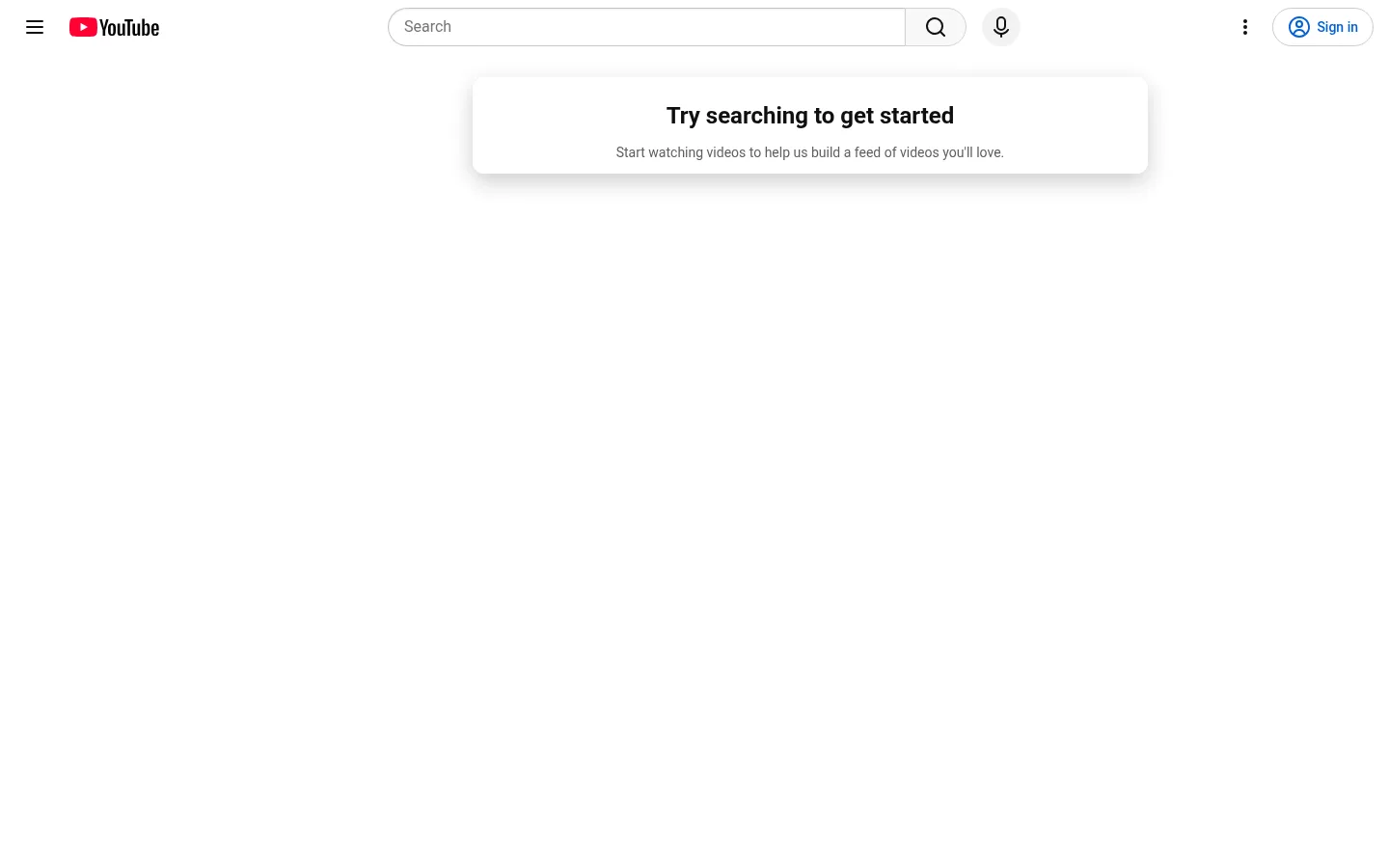
The page is defined by a white canvas, black primary text, muted gray supporting text, and a restrained blue accent reserved for interactive cues such as the sign-in action. The compact header spans the top edge: menu and wordmark sit left, search occupies the center, and account actions remain at the right. Roboto keeps labels and interface copy familiar and functional, while the heavier display face gives the empty-state heading a clear focal point. The main content is deliberately sparse: a small elevated message card sits near the top center, surrounded by a large uninterrupted field of white. Rounded search and sign-in controls soften the otherwise crisp interface; thin gray borders distinguish controls without creating strong section bands. There is no visible editorial photography or promotional artwork in this viewport, so spacing and hierarchy do the work of directing attention.
Interface labels, navigation, search, helper text, and general body copy.
Aa 设计
YouTube Marquee Beta
系统字体 · 字重 600 · 占比 27%
免费替代:Roboto
Prominent empty-state heading.
角色
示例
字号
字重
行高
字距
一级标题
Empty-state heading that anchors the centered prompt card.
The quick brown fox 敏捷的狐狸
24px
600
1.33
0
正文
Supporting sentence and general interface copy.
The quick brown fox 敏捷的狐狸
14px
400
1.43
0
导航
Header navigation and utility labels, including account actions.
The quick brown fox 敏捷的狐狸
14px
500
2.86
0
间距与布局
基准单位 4px · 密度:适中
56px版块间距
—元素间距
—卡片内边距
—内容最大宽度
1px
4px
8px
12px
14px
15px
16px
18px
24px
36px
42px
56px
A full-width header forms the only strong horizontal structure, with left-aligned menu and wordmark, centered search, and right-aligned account controls. Below it, a single prompt card is centered horizontally near the top rather than vertically centered. The measured viewport shows no populated feed grid; open white space dominates the remaining canvas. Keep the composition sparse and comfortable, preserve clear separation between header and prompt, and avoid inventing a page maximum width or unmeasured spacing values.
圆角与层次
按钮 · 9999px
卡片 · 12px
导航 · 9999px
inset · nav
md · card
Most of the interface reads as flat, with thin neutral borders defining search and account controls. The empty-state card is the notable elevated element, using a soft shadow and rounded corners to separate it gently from the white canvas. Keep depth restrained and avoid heavy outlines or stacked panels.
组件
下面的预览按实测的按钮、输入框、徽标、卡片样式重建(字体用替代字体)。
Top utility navigation
A compact full-width row with menu and YouTube mark at left, centered search tools, and overflow and sign-in actions at right.
Search field
A long, rounded outlined input with a muted Search hint and a distinct search-action segment.
Sign-in action
An outlined pill control using YouTube Blue for its account icon and label, with a thin neutral border.
Empty-state prompt
A centered white card with a bold discovery heading and a smaller muted sentence encouraging users to watch videos.
Utility icon buttons
Small, low-emphasis menu, microphone, and overflow controls using dark iconography on the light canvas.
Imagery · No prominent photography, illustration, or video thumbnails appear in the measured first viewport. The homepage is in an empty discovery state, so the prompt card and search affordance carry the visual message. Keep any brand mark or interface iconography confined to navigation and controls; do not add decorative hero imagery that would disrupt the open canvas.
Keep navigation compact and horizontally organized.
Use rounded outlines for prominent controls.
Let empty space remain an intentional part of the layout.
✕ 不该做
Do not add large colored section backgrounds.
Do not turn the empty state into a promotional hero.
Do not use heavy shadows across the interface.
Do not make muted copy compete with the heading.
Do not fill the open canvas with decorative imagery.
Do not invent additional palette colors.
给 AI 的提示词
想快速出一个同风格的新页面,把这段话连同 DESIGN.md 一起发给 AI。
Build a new page in YouTube’s light, utility-first visual style. Use Gallery White (#ffffff) as the dominant canvas, Screen Ink (#0f0f0f) for primary copy and icons, and Soft Graphite (#606060) for supporting text. Keep YouTube Blue (#065fd4) for restrained interactive emphasis, with Quiet Divider (#c6c6c6) and the measured control grays (#cccccc, #d3d3d3) limited to fine borders. Use Roboto for interface text and a compact semibold heading treatment. Organize a slim, full-width header with navigation, centered search, and right-side account actions. Place the main content in a clear, horizontally centered focal area, preserve generous open space, and use gentle elevation only for a key card. Favor rounded controls and precise alignment over decorative artwork or dense panels.